
Bookings
- Property
- Dates
- Review
Set the dates. Review calendar changes. Keep the stay current.
Manage bookings
Illustrative property scenes
Your complete hosting toolkit.
Run every stay, from anywhere. Prepare the turn, understand your market, and answer reviews with the record in hand.
Use the local kit on any device. Connect a workspace to share progress and photos across devices.
Demo: Opens in your browser.
Market sources: Local rules, lodging tax, protections, costs and market data, each with its source
iPhone and Android store details.


Prepare for arrival, coordinate the turn and keep the follow-up with the stay.

Set the dates. Review calendar changes. Keep the stay current.
Manage bookingsKeep policy details and preparation questions beside the stay.
Prepare insurance records
Prepare a handoff, review submitted work and record your decision.
Open cleaner handoffSave the work needed, timing and scope in a request brief.
Prepare a service request
Organize the issue, supporting files and dated actions in one case.
Prepare a claim recordKeep contact details with the case. Follow the platform link yourself.
Review platform contactRecord dated observations with supporting context for your own review.
Keep private observationsYou review and confirm external actions. Connected messaging, insurance quotes and coverage, provider dispatch and marketplace payments are not enabled. Private guest observations are not shared ratings. Cleaner scheduling requires a connected workspace and an available service.
Agree on the window, share one link, and review the photos and work your cleaner sends back.
Available in the web app, with a connected workspace
Link-only contributors need no account or payment. A response records whoever holds the link; acceptance records your review, not a guarantee of property condition.
The schedule, the answer, the submission and your decision in one job history with the stay. Sharing is marked by you, never assumed.
Read the first-turnover guide →One link, one job, no account. The property label, the window in its time zone, the instructions you approved, and two answers.
Read the first-turnover guide →Invitation secrets are kept in dedicated server-encrypted storage so authorized workspace members can reopen an invitation. StayTurn can recover those secrets. This is not end-to-end encryption from StayTurn. The cleaner handoff record and Photo Drop remain available beside it.
What's in StayTurnBring bookings, reusable checklists, progress and readiness together. No subscription.
Create and change local stays, compare imported calendar changes, and apply the updates you review. Changes stay in StayTurn.
Open the stay workspace →Save the turn-prep steps that belong to each property and reuse them for the next stay.
Read the checklist guide →Mark assigned work as not started, in progress, or done so the handoff reflects the work already completed.
Read the handoff guide →See whether the turn is ready for arrival and which unfinished items still need attention.
Read the readiness guide →Booking changes update StayTurn and leave the source calendar unchanged. Review a linked cleaner schedule separately. Saved records synchronize when you work in a connected workspace.
Draft the public reply from the dated observations and documented actions saved with the stay. Review help checks the wording and exports the draft with a record manifest. You decide what to post; the platform decides what it publishes. If you also report the review, the cover note quotes the platform's published policy text as retrieved.
Open the sample stay, then Review help
Keep photos, receipts, costs, notes, and handoffs with the stay as the work happens.
Demo data · in your browser
See the sample stay record (PDF). Your export uses the same structure with the files you add.
Prepare a claim with saved evidence and a dated timeline, then follow the linked platform steps. Connected reservation messaging requires a supported partner and verified access; it does not file a claim or contact platform support.
Local records stay on your device unless you share them. In a connected workspace, saved records and files synchronize for authorized operators. StayTurn manages the encryption keys for shared records. You choose whether to include existing device records. You can also download a record or, where supported, keep a separate folder copy.
Import previews are processed on your device and leave source files unchanged. Records you save into a connected workspace synchronize with that workspace. You choose when to export or back up the record.
For desktop folder access, use Chrome or Edge. Other storage and export options depend on your browser; the product page lists tested browser support.
See sourced market context beside the costs you enter. Keep your operating numbers separate from public benchmarks.
| Cleaner and housekeeper wages (BLS OEWS, SOC 37-2012) | National · May 2025 |
|---|---|
| Mean hourly wage, employees | $17.83 |
| Median hourly wage, employees | $17.07 |
| Mean annual wage, employees | $37,080 |
| Median annual wage, employees | $35,510 |
| Employment, employees | 860,670 |
| Employment, traveler accommodation | 415,160 |
Selected states illustrate geographic variation, not a market ranking.
BLS employee wage benchmarks, not cleaner quotes or total turnover costs. Public sources retain their dates and geography; check the primary source before acting.
Source: U.S. Bureau of Labor Statistics, OEWS May 2025 National and State files (state download), SOC 37-2012. National file accessed 2026-07-18; state files accessed 2026-07-25. "BLS.gov cannot vouch for the data or analyses derived from these data after the data have been retrieved from BLS.gov." Employee wage benchmarks exclude self-employed workers, private-household workers, contractor markup, supplies, travel, taxes, benefits, and platform fees; actual local and contracted rates may differ materially. Methodology: how every number is sourced.
Percentiles describe the spread of employee wages within this occupation nationally; they are not quotes, contractor rates, or turnover prices.
Search sourced entries on local rules, lodging tax, platform protections, operating costs, climate and market data. Every result keeps its source attached.
Research support, not legal, tax, insurance, platform, or claim advice. Check the linked primary source for the current rule or policy.
Example source · New York CitySee the official registration rules from the Mayor's Office of Special Enforcement, with the jurisdiction and source attached.
Open the example source →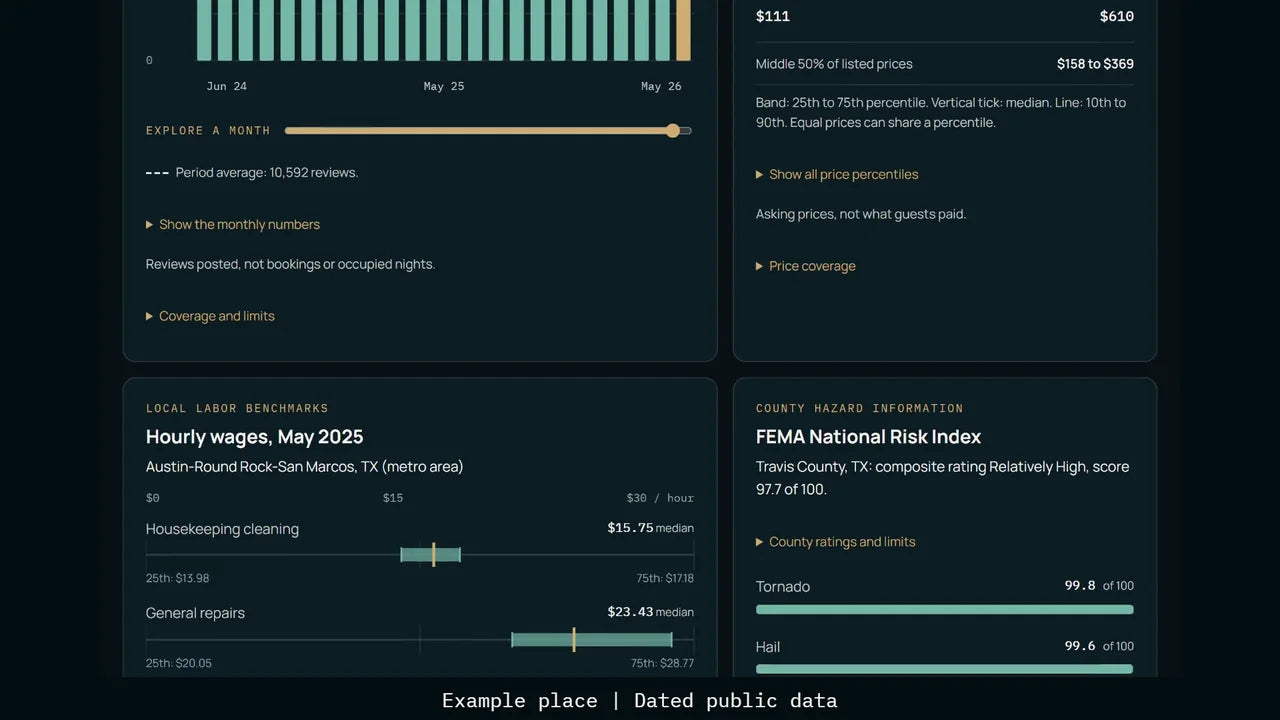
The live StayTurn web app, with demo data. Property scenes are illustrative.
Narrated walkthrough with captions and a complete transcript.

Checkout is at ten. The next guest arrives at four. Everything in between is the turn.
On most teams, that work lives in texts, notes, and somebody's memory. StayTurn keeps it with the stay. Before arrival, during the stay, and after checkout.
Open the stay, and the turn prep is waiting. Check it off task by task, before the guest and after.
Plan the turnover, and keep the cleaner's updates with the stay.
Photos, receipts, and notes go straight to the stay. Review the costs, see the gaps, and export the record with the originals.
Know your market. Asking prices, review activity, wages, and risks, from dated public data.
When a review comes in, draft the reply with the record in hand.
And if a stay needs a claim, build the case from the record. You submit it on the platform yourself.
StayTurn. Run every stay, from anywhere. See it at demo.stayturn.co.
Three checklist items change the record from 0 of 14 to 3 of 14. Actual app capture with demo data. Silent video.
One operator.
$19.99 onceView product → TeamUp to 10 operators, including the owner.
$39.99 onceView product → UnlimitedUnlimited operators.
$99.99 onceView product →Link-only cleaners and contributors are always free. Each workspace includes 10 GiB of encrypted file storage. Unlimited refers to operators. Connected workspaces require sign-in.

